
Automate your marketing workflow between teams, collaborators, and other stakeholders
Modern marketing teams move fast, but legacy marketing file transfer workflows often slow them down – especially when teams need to move large video and other media files.
- Campaigns often rely on high‑resolution creative and other heavy assets that must be shared quickly across internal teams, agencies, and others.
- Email limits, unreliable or slow transfers, a lack of automation, and scattered cloud folders create delays and missed deadlines – especially when distributed stakeholders are involved.
In this post, we’ll demonstrate how marketing teams can integrate secure, compliant transfer with their favorite tools and configure it for speed and automation, eliminating the burden of repetitive marketing tasks. Follow this workflow to transform your file transfer workflow from a momentum-killer to a creative thriller.
Table of Contents
The 3 Pillars of a Marketing File Sharing Workflow
Unlike the creative agency file transfer workflow – where work is mostly produced for external clients and files often move outside the organization – in a high‑performing marketing file transfer workflow, work is primarily produced for internal use and campaigns.
The secure file sharing for brand managers and marketing teams workflow rests on three essential pillars:
1. Organization
A centralized system with clear naming conventions, consistent folder structures, and a clear separation between work‑in‑progress and final deliverables. This reduces version confusion and makes assets easy to find and trust, so you can execute your marketing strategy faster.
How to achieve it: Designate a centralized hub for all marketing files that becomes the system of record. Define and enforce strict naming conventions, standardized folder structures, and clear rules for what lives where. Separate work‑in‑progress, review, and final assets so teams always know which files are safe to use during the creative process.
2. Orchestration
Connect file transfers to how marketing work actually happens by integrating with cloud and on-prem storage, media asset managers, and other project management tools. Ideally, you should be able to automate file transfer workflows once you’ve integrated these tools.
How to achieve it: Find a file transfer solution that offers no-code integrations with third-party tools you already use as part of your workflow, and that can automate transfers into or out of those tools without scripting or additional software. Automate everything you can, from transfer workflows to notifications to stakeholders.
3. Security and compliance
Protection of sensitive campaign data through secure, compliant transfers. Controlled access, visibility, and safeguards for auditability are essential when sharing files.
How to achieve it: Ensure your file transfer solution applies security by design, not as an afterthought. Use role‑based access, transfer expiration dates, and download controls when sharing files. Encrypt files in transit and at rest, maintain audit trails to track who accessed what and when, and ensure your solution is compliant with data privacy regulations like SOC 2 Type II.
Step-by-Step: Building Your Marketing File Sharing Workflow
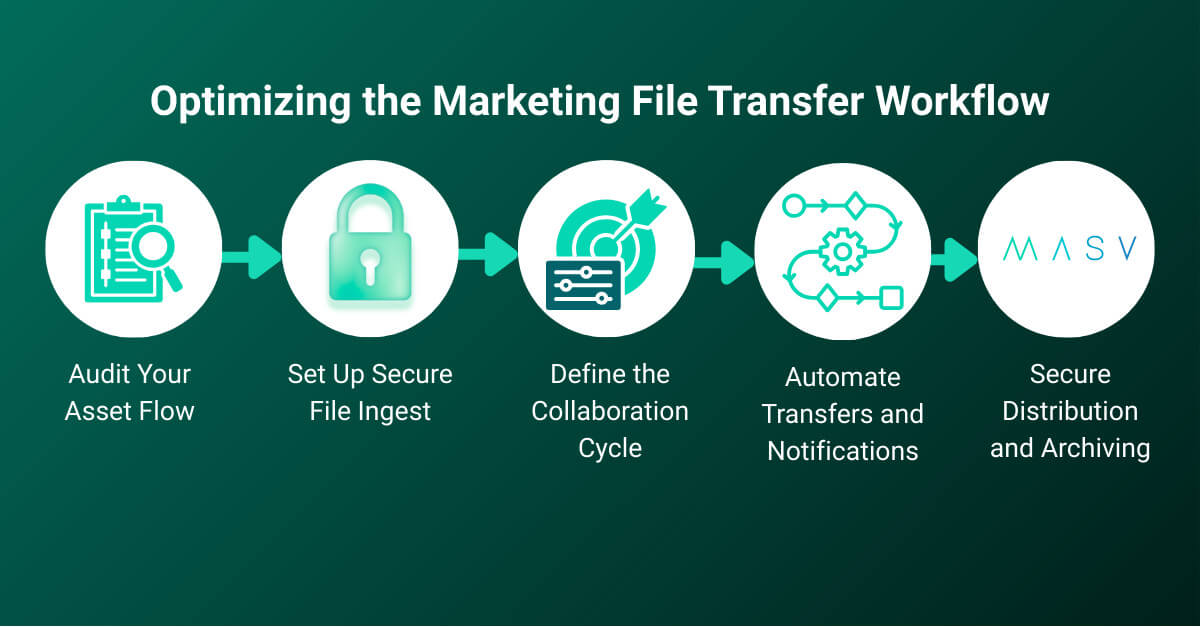
For those looking for marketing workflow examples, here’s an end‑to‑end file sharing workflow built around intelligent managed file transfer (MFT) and other commonly used marketing tools. It’s designed to fit seamlessly in your marketing department’s content creation process to support large files, fast collaboration, and secure sharing without breaking existing workflows.
Step 1: Audit your asset flow 🔍
Start by mapping how files move through creative and marketing teams at your organization. Identify where assets originate (such as freelance videographers or photographers), where they need to go (such as storage or asset management/review platforms), and which stakeholders need access.
- Make sure to audit your typical file package sizes, formats, and frequency of transfer, along with security and compliance requirements for sensitive campaigns or embargoed launches.
- This audit clarifies where file transfer fits best as the high‑speed transfer layer and which systems should be integrated with your file transfer solution.
- Determine your desired naming conventions, file types, and which metadata you need attached to uploads.
⚒️Tools: Visual collaboration tools like Miro or Lucidchart, and project management platforms like Asana or Monday.
Step 2: Set up secure file ingest ⬆️
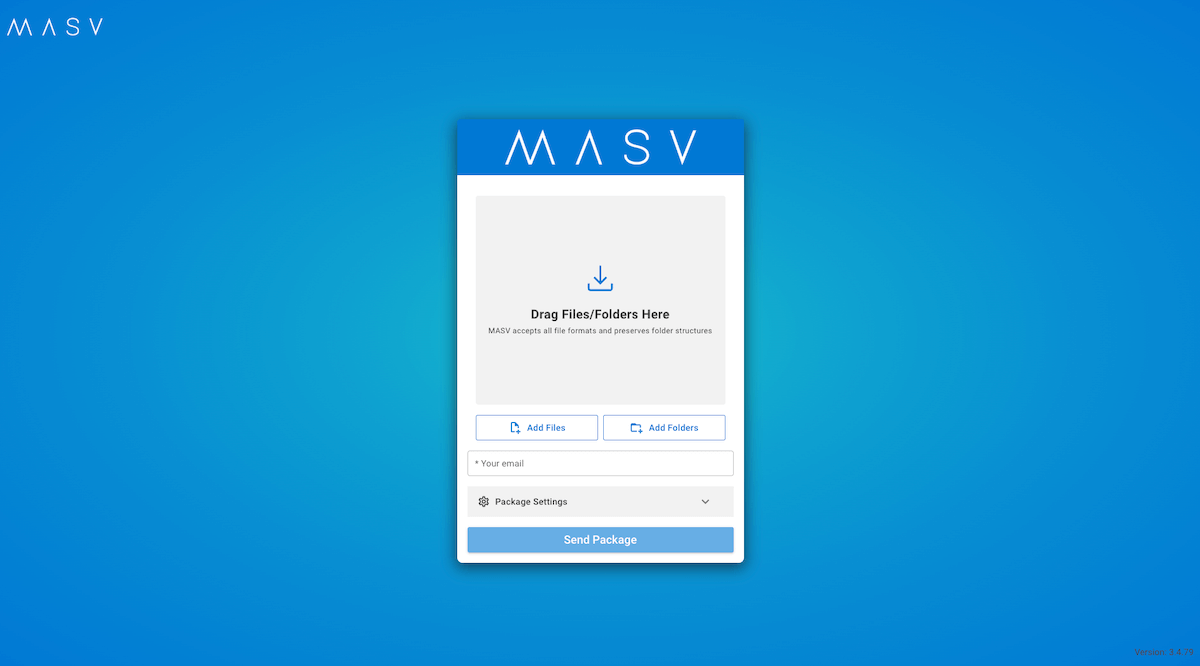
Create a standardized content ingest process using a simple, browser-based file sharing platform tool like MASV Portals to collect files from internal or external stakeholders. Branded portals reinforce trust while enforcing security, access control, and upload requirements (such as file types or naming conventions), helping to solidify internal and external file sharing best practices.
- Configure your ingest solution to automatically deliver incoming files to centralized cloud storage such as Google Drive, Dropbox, OneDrive, or Amazon S3, connected on-prem storage like Synology or Qumulo, a digital asset management (DAM) tool, or a media asset manager (MAM) like Frame.io or Cantemo (see next step).
- Configure and enforce upload requirements such as metadata and naming conventions.
- You can use a tool like MASV Portals to request files from anyone in the world, even if they’re in a remote location with limited connectivity. Just send the collaborator a link to your portal and they can drag-and-drop media without needing an account.
- Configure role-based access to ensure only the right people have access to the right files.
⚒️Tools: MASV Portals, MASV storage integrations; cloud/on-prem storage platforms like OneDrive, Google Drive, or Dropbox; media asset managers like Frame.io or Cantemo.
Note: For a more advanced workflow, you can use tools like Monday, Zapier, and webhooks to automate MASV Portals creation when a task status changes in your project management platform. This workflow automatically emails collaborators with a unique upload link, logs the action, and can send reminders.
Step 3: Define the collaboration cycle 🤝
Route incoming files into a clearly documented review and approval process. Use review tools like Frame.io or Figma for comments and annotations.
- Establish versioning rules – only approved files are promoted to a “Final” folder, for example, while assets still being created, edited, or reviewed remain in a “Work in progress” folder.
- Clearly labeled folders like /Campaign/WIP/ and /Campaign/Final/ are advisable.
- A tool like MASV handles large file movement between contributors, team members, and systems, while collaboration tools manage feedback and approvals.
⚒️Tools: Review platforms like Frame.io/Figma, Asana/Monday, MASV.
Step 4: Automate transfers and notifications 🤖
Set up file transfer automations (based on the integrations we set up in Step 2) to remove manual steps that slow down production cycles and can lead to human error (such as WIP assets being moved to cold archive storage with expensive data egress).
- Configure transfers to one or multiple destinations to trigger automatically when files are moved to a specific folder or portal. MASV Watch Folders are perfect for this.
Note: MASV can perform one-to-many uploads to multiple destinations, such as fast storage for editing and cloud storage for backups, simultaneously and automatically.
- Configure automated Slack notifications when files are received, approved, or delivered, keeping the creative team aligned without constant check‑ins or manual updates.
- Automations ensure files move at the speed of the campaign, not the speed of email follow‑ups.
⚒️Tools: MASV automations, MASV storage integrations, collaboration platforms like Slack or MS Teams.
Step 5: Secure distribution and archiving 🔐
For final delivery, generate secure MASV sharing links with expiration dates, password protection, and download controls for a fast and reliable way to share heavy finished files with printers, PR firms, or media partners.
- Once delivery is complete, apply storage automations to long-term cold storage tiers for archival purposes.
- This keeps active workspaces clean while maintaining compliance and retrievability for future campaigns.
- Storage lifecycle policies can be documented in project management software.
⚒️Tools: MASV secure links, cold archive storage tiers, Asana/Monday.
Follow these five steps and you’ll have a fast, secure, and scalable marketing file sharing workflow where MASV powers high‑speed transfer, integrated tools handle collaboration, and workflow automation and integration keeps everything moving on time.
Choosing the Right Tech Stack for Your Marketing Operations Workflow
Unsure which tool or technology to use in each step of the workflow cycle? We’ve got you covered with the table below:
| Workflow Step | Requirement | Potential Tools |
|---|---|---|
| Asset Audit | Visual collaboration, project management | Miro/Lucidchart; Asana/Monday |
| Secure Ingest | Secure file ingest to cloud and/or on-prem storage, media asset managers | MASV Portals/storage integrations; Dropbox/Google Drive/OneDrive storage; Frame.io/Cantemo |
| Collaboration | A clear review workflow with documented versioning rules | Frame.io/Figma; Asana/Monday; MASV |
| Automated Transfer & Notifications | Preconfigured triggers for automated actions | MASV automation tools (Watch Folders/API/Agent) and storage integrations; Slack/MS Teams |
| Secure Distribution | Final delivery to social media channels or other platforms, and archive storage | MASV secure links and cold storage tiers; Asana/Monday |
Marketing File Sharing: Best Practices Checklist
The marketing asset management process can be a lot to remember! Here’s a brief, practical best practices checklist marketing teams can keep handy, based on the workflow above:
- Centralize files in a single system of record such as Google Drive, Dropbox, or OneDrive; avoid inboxes and individual storage.
- Separate WIP and final assets with clear folder structures and standardized, documented naming conventions.
- Use secure intake portals for collaborators to upload files; enforce upload rules.
- Leverage marketing approval workflow software for comments and approvals instead of email threads.
- Automate transfers and alerts with storage integrations, triggered transfer workflows, and collaboration platform notifications.
- Control access by role and apply expiry dates to links.
- Protect sensitive campaigns with encrypted transfers and audit trails.
- Archive content once delivery is complete to keep workspaces clean and ensure you don’t misplace past projects.
Create the Ultimate Marketing File Sharing Workflow With MASV
Modern marketing moves too fast for fragmented file sharing. A structured marketing file sharing workflow isn’t just a nice to have – it turns file transfer from a cost center into a strategic advantage.
By building a workflow grounded in organization, orchestration, and security – and powered by tools like MASV and other integrated platforms – teams can eliminate friction without slowing creativity. The result is fewer manual handoffs, clearer approvals, and faster, more confident delivery of high-quality content and campaign assets.
Sign up for MASV for free and learn how MASV can improve your file sharing workflow.
Get Started For Free.
Receive free monthly benefits, forever.