
How newsrooms can use cloud-native transfer tools to automate and speed up content ingest, and improve time-to-air
Field to newsroom video transfer is what makes news organizations tick. It’s a vital bridge between content acquisition and ingest at the central newsroom, encompassing the movement of heavy video files from remote locations into storage and media asset managers (MAMs).
Without this link, even the most powerful footage won’t have an impact. That’s because time-to-air is everything in news, and moving content fast and reliably is crucial.
But video-based news gathering has traditionally relied on costly satellite or microwave uplinks, complex UDP or FTP software, or “sneakernet” physical drive transfers. This article illustrates how today’s cloud-native ingest solutions are faster, more reliable, and built for flexibility at every stage of the news-gathering workflow.
Table of Contents
Let your journalists work independently
Drag-and-drop MASV Portals enable reporters in the field to upload big files with no training, tutorials, or technical help required.
Stages of the Newsroom Ingest Workflow
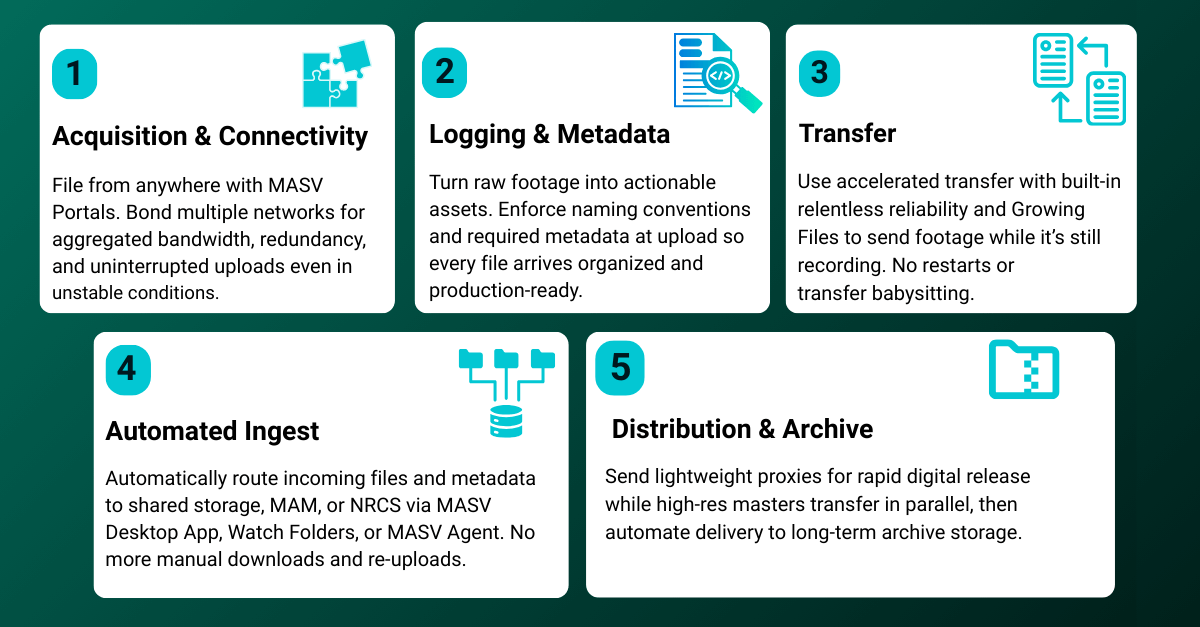
Ingesting high-quality video for broadcast or other news workflows isn’t a one-and-done event – rather, it’s a complex workflow involving five main stages: Acquisition, logging, transfer, ingest, and distribution. Let’s dive into each one.
Stage 1: Acquisition and connectivity
The first stage of any video news and journalism file transfer workflow – acquisition – often happens in the least predictable environments.
- Journalists who shoot video on mobile devices rarely operate from pristine network conditions.
- Video journalists often file from areas with low connectivity such as disaster zones and rural areas, or use congested hotel and public Wi‑Fi networks with unstable latency, packet loss, and throttled upload speeds.
Modern connectivity options have improved, but not eliminated, these challenges. 5G coverage can be inconsistent under network congestion. Starlink is sensitive to weather and obstructions like trees or buildings. And public hotspots are often slow, unreliable, and unsecured.
How cloud-native, accelerated transfer helps: This is where the relentless reliability of cloud‑native, accelerated transfer technology makes a measurable difference for mobile journalism, particularly when deployed using channel bonding:
- Journalists can use a browser-based, drag-and-drop MASV Portal to upload file packages of any size from anywhere with no training, tutorials, or heavy software installs.
- Instead of relying on a single fragile connection, journalists can bond multiple networks together, such as a Starlink terminal and a 5G hotspot.
- This provides aggregated bandwidth that accelerates uploads while providing full redundancy. If one signal drops mid-transfer, the other connection seamlessly carries the load with no restart required.
Stage 2: Logging and metadata
The next critical step is logging and metadata. Without that, even the most important video becomes a collection of anonymous files with no context, no ownership, and no clear purpose – a recipe for missed deadlines in a fast-paced newsroom.
That’s why news organizations require clear naming conventions – such as “Date_Slug_Reporter” – that instantly communicate when the footage was shot, what the story is, and who captured it.
A slug acts as the story’s working title throughout production. When every file carries the correct slug, editors and producers can immediately route, prioritize, and assemble content without confusion.
How cloud-native, accelerated transfer helps: Technology can help enforce consistency around naming conventions and metadata.
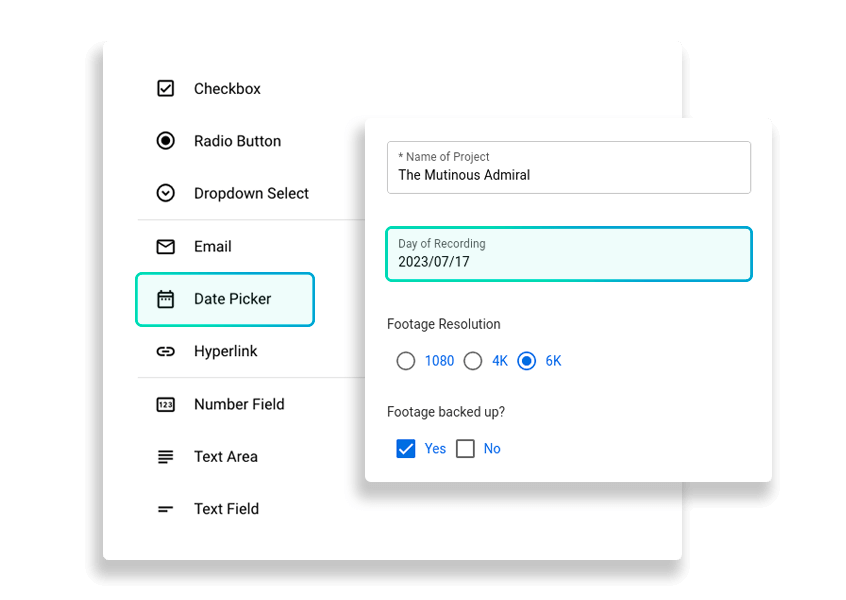
- Custom Forms on MASV Portals allow teams to create custom metadata fields that reporters must complete before uploading.
- Required fields ensure that no file enters the system without proper context, with editors seeing all essential information the moment the file lands.
Structure equals speed in the logging and metadata stage: By combining standardized naming conventions with enforced metadata capture, broadcasters transform raw uploads into organized, actionable assets with minimal overhead.
Stage 3: Transfer
FTP and UDP-based transfers often struggle in fast-paced news workflows because they’re fragile over unstable networks, lack built-in reliability, and frequently require manual restarts after interruptions. They also demand IT configuration and aren’t firewall-friendly.
Shipping hard drives adds even more delay, cost, and risk of loss or damage. In deadline-driven journalism, these methods are too slow, brittle, and operationally complex to keep up.
Intelligent managed file transfer (MFT) from a provider like MASV, however, offers real productivity gains for newsrooms and mobile journalists who need to send video. This includes the ability to start transferring footage while it’s still being recorded (via Growing Files), allowing editors to start working on files without waiting for live coverage to end.
Comparison table: MASV vs. FTP vs. Physical Drives
| Feature | MASV (Intelligent MFT) | Standard Cloud / Legacy FTP | Shipping Physical Drives |
|---|---|---|---|
| Speed / Latency |
Very low Accelerated global private network with file chunking, bandwidth saturation, auto-resume, and 10Gbps transfer optimization. |
Medium to high Bottlenecked by lower-grade infrastructure, public internet congestion, and FTP protocol inefficiencies. |
Very high latency Transit takes 24 to 72 hours (or longer), regardless of file size. Speed is limited by courier logistics, not bandwidth. |
| Reliability |
Very high Purpose-built for massive files with checkpoint restart, automatic retries, and no file package size limits. |
Medium to low Restrictive file size limits and frequent timeout failures. Large transfers often restart from scratch due to packet loss. |
Medium Risk of hardware failure, physical damage, theft, or shipping delays. No checkpoint restart if a drive fails. |
| Ease of Use |
Simple Drag-and-drop uploads, browser-based access, no-code automations, and no account required for contributors. |
Moderate to complex Cloud tools are simple for small files, but FTP/MFT systems require technical setup and ongoing management. |
Manual Requires copying data, packaging hardware, coordinating couriers, and managing return logistics. |
| Cost |
Flexible Annual subscriptions, prepaid credits, PAYG, or custom enterprise pricing with no per-user fees. |
Subscription or high overhead Flat monthly cloud fees or high licensing, infrastructure, and maintenance costs for legacy systems. |
Fixed Drive costs ($50 to $200+) plus overnight courier fees ($30 to $100+), with recurring hardware replacement. |
| Security / Infosec |
Enterprise-grade TPN Gold Shield, SOC 2 Type II, ISO 27001, with encryption in transit and at rest. |
Variable Cloud platforms vary in compliance; legacy FTP requires ongoing patching and manual security management. |
Moderate risk Susceptible to theft, loss in transit, or unauthorized physical access. |
| Ideal For | Time-critical, secure, and reliable delivery of massive files anywhere in the world. | Small to medium files, internal collaboration, and non-time-sensitive transfers. | Transfers where speed isn’t critical and physical handling risks are acceptable. |
Stage 4: Ingest
In many broadcast environments, ingest still involves a manual step: someone on the assignment desk downloads files from email links, cloud storage, FTP servers, or a shipped drive, then re-uploads or copies the files into shared storage for editors.
It’s a small task, but repeated dozens of times a day it becomes a serious bottleneck. More importantly, it pulls journalists and producers away from editorial decision-making and into file wrangling (or asking for technical help).
How cloud-native, accelerated transfer helps: In a modern workflow, the assignment desk shouldn’t be in the download business at all. Ingest should be automatic, predictable, and invisible.
- That’s where automation tools like the MASV Desktop App, Watch Folders, and MASV Agent come into play.
- Once a reporter uploads footage and associated metadata to a MASV Portal, the newsroom’s designated ingest location can automatically receive it after a no-code automation is configured. The configured automation monitors for incoming packages and routes them directly into a predefined destination folder.
From there, the files are immediately accessible to editors via shared storage, connected MAM systems, or newsroom computer systems (NRCS) with no manual intervention required.
This automation eliminates unnecessary handoffs, reduces the risk of misplaced files, and ensures footage moves seamlessly from the field to the edit bay.
Stage 5: Distribution
Modern newsrooms no longer produce for a single broadcast or web destination – they often publish simultaneously to social media platforms, web, OTT, and linear TV. That reality makes proxy workflows essential.
- High‑res and 4K masters are critical for color grading, compliance, and the evening news broadcast.
- But they’re large and take time to move, even with accelerated transfer. Proxies – lightweight, lower‑bitrate versions of the same footage – solve this because they’re fast to generate, quick to transfer, and well suited for web publishing.
Distribution, however, doesn’t end there: Archival is the final step. Both the high‑res file and its associated metadata should be stored in long‑term archive storage, ensuring future retrievability for follow‑ups, legal needs, or follow-up coverage.
How cloud-native, accelerated transfer helps: A field reporter can upload a small proxy file via MASV immediately after capture, allowing the digital team to start cutting stories immediately or post a breaking clip to social media in minutes.
Meanwhile, the full‑resolution footage transfers in the background for editors preparing the evening broadcast package. Audiences get instant updates, and the production team retains the quality needed for prime time.
When it comes to archival storage, cloud-native tools like MASV offer no-code integrations with cold storage tiers like Glacier, Glacier Instant Retrieval, Glacier Deep Archive, Standard-IA, and One Zone-IA. Data orchestration workflows can be built that automatically trigger ingest to archival storage.
Solving Modern Journalism Pain Points with MASV
MASV intelligent managed file transfer (MFT) accelerates and automates large file transfers over any network, eliminating fragile FTP and legacy MFT workflows. With Portals, enforced metadata, Growing Files, Multiconnect channel bonding, automated ingest, and seamless cloud integration, MASV helps get files from the field to the newsroom fast and without IT complexity.
Speed, simplicity, and security define modern broadcast workflows, especially for breaking and live reporting. MASV addresses these pain points directly through:
- Growing Files: The secret weapon for long-form and live-adjacent reporting, news organizations can use Growing Files to start transferring a file while it’s still being recorded to disk. That means editors can start cutting interviews while they’re still being filmed, and live productions can keep moving without waiting on full file completion.
- No-code, branded upload Portals for reporters and freelancers: Staff reporters and freelancers aren’t necessarily technically savvy, and don’t have time to install complicated software or figure out complex user interfaces. Browser-based, drag-and-drop upload Portals can be used on a mobile phone and require no login, VPN, or account provisioning. They can be configured with custom metadata fields to ensure proper slugs and story IDs, allowing reporters to send large video files without training or tutorials.
- Automated workflows: Newsroom staff don’t have time to download large files from the field and re-upload to storage or MAM destinations, or engage in endless back-and-forth during remote collaboration. MASV integrates with most modern cloud and connected on-prem storage with little to no coding, enabling automated data ingest workflows that keep things moving fast.
- Enterprise-grade security: Investigative journalism, confidential sources, and valuable intellectual property demands airtight protection. MASV combines TPN Gold Shield status with an ISO 27001 certification for information security management and SOC 2 Type II compliance validating enterprise-grade data handling.
From the speed of Growing Files workflows to secure, frictionless uploads from anywhere, MASV transforms file transfer from a workflow bottleneck into a strategic advantage for modern newsrooms.
Enable Automated, Field-to-Newsroom Video Transfer With MASV
When it comes to field-to-newsroom video transfer, shipping drives, relying on fragile FTP servers, or wrestling with legacy MFT systems slows down the very thing that matters most: getting the story to air first.
These traditional methods introduce delays, manual handoffs, technical failures, and unnecessary costs at every stage, from acquisition to distribution.
Cloud-native ingest solutions like MASV eliminate the bottlenecks of traditional file transfer for newsrooms.
- With accelerated transfer, Growing Files, no-code Portals, automated ingest, and enterprise-grade security, footage moves seamlessly from the field to the edit bay without unnecessary downloads, workarounds, or IT friction.
- The result is measurable: faster turnaround, reduced operational overhead, fewer errors, more efficient teams, and happier and more loyal viewers.
Contact one of our workflow experts to learn more about how MASV can improve your newsroom’s content ingest processes, and give your team the right tools to be first on every important story.
Save newsroom cycles with automation
Do away with manual uploads and downloads. MASV automations allow newsrooms to ingest content from the field automatically.